GitHub Sidekick: Supercharge Your GitHub Experience
GitHub Sidekick is a browser extension for Chrome that aims to enhance your GitHub experience by integrating an AI assistant, ChatGPT, directly into the GitHub user interface. Developed by Riley Miller, this free extension is designed to save developers time and increase productivity.
Top Recommended Alternative

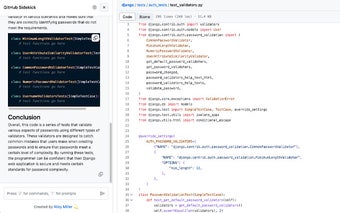
With GitHub Sidekick, you can have ChatGPT conveniently located next to your source code, allowing you to quickly access its features without the need for copy/pasting. This integration enables you to effortlessly write code and receive assistance from the AI assistant in real-time.
One notable feature of GitHub Sidekick is the availability of prompt macros, which can help you save time by providing pre-defined prompts for common coding scenarios. This eliminates the need to manually write out repetitive prompts, streamlining your workflow.
Privacy is a key focus of GitHub Sidekick. The extension ensures that your code, prompts, and completions are stored solely on your local computer, providing a secure and confidential environment for your work.
Furthermore, GitHub Sidekick allows you to bring your own OpenAI API key. This means that you only pay for the API usage you require, giving you control over your expenses.
Overall, GitHub Sidekick is an invaluable tool for developers who want to optimize their GitHub experience. By integrating an AI assistant and providing time-saving features, this extension helps developers become more efficient and productive in their coding endeavors.